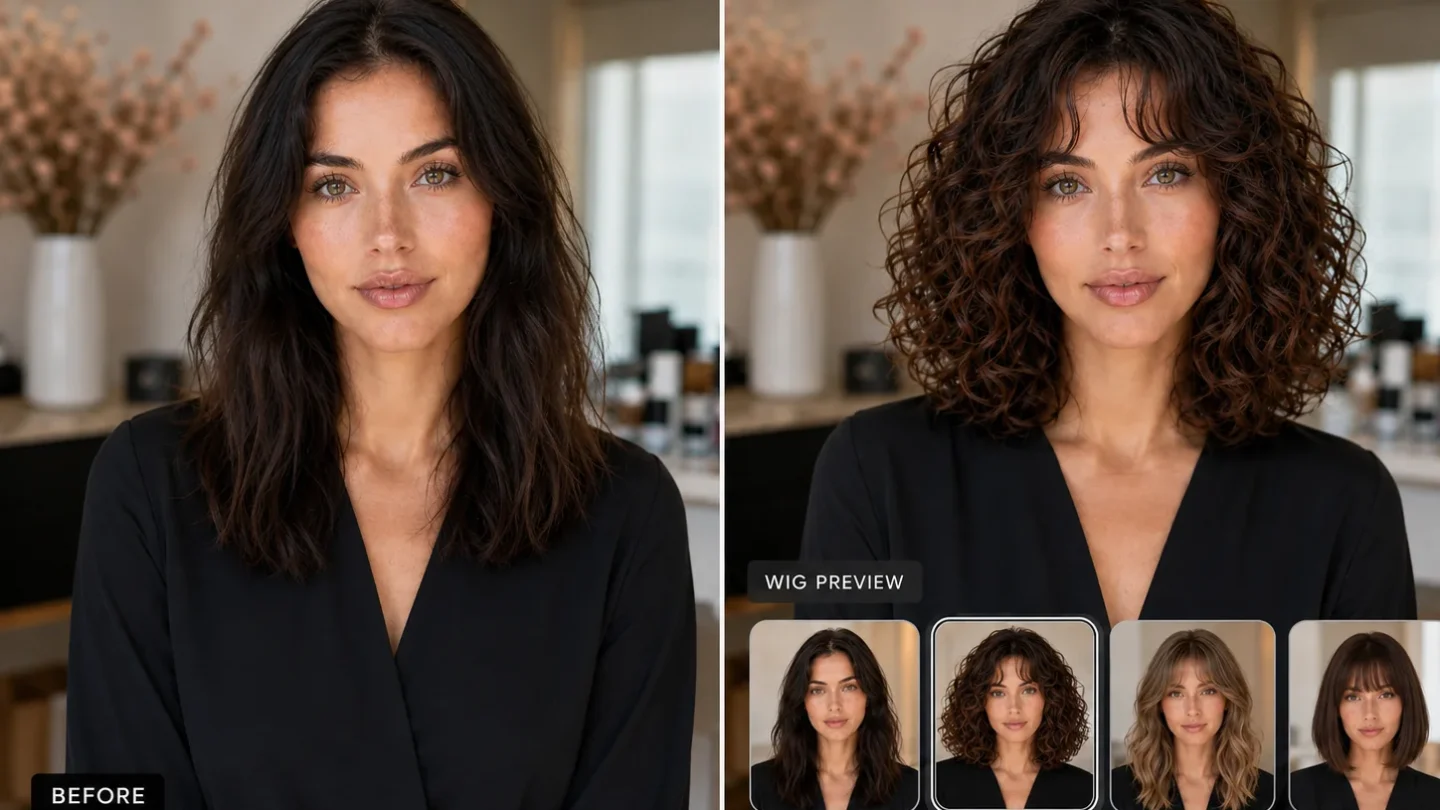
You find a haircut that looks perfect. The length is right, the layers are soft and the bangs somehow behave themselves. Then comes the difficult question: will it look anything like that on your own hair?
For people with curly or wavy hair, a reference photo only tells part of the story. Your curl pattern, density, shrinkage and normal styling routine can change the finished shape considerably.
An AI hairstyle preview gives you another way to explore the idea before booking your appointment. It can help you compare lengths, bangs, volume and color on your own face. What it cannot do is predict exactly where every curl will land after the scissors come out.
The useful approach is somewhere between blind trust and dismissing the tool as a novelty.
Can AI Show Exactly How Your Haircut Will Look?
No. An AI hairstyle preview is a visual mockup, not a technical forecast of your salon result.
It can answer broad questions:
- Do you prefer yourself with short or long hair?
- Does a fringe change the balance of your face?
- Would you rather have volume near the crown or around the cheeks?
- Do warmer or cooler hair colors suit the look you want?
- Does a dramatic cut still feel like you?
It cannot reliably calculate your precise shrinkage, natural density, curl clumps or the amount of daily styling required.
| Useful for comparing | Not reliable for predicting |
|---|---|
| Short, medium and long silhouettes | Exact dry length |
| Bangs versus an open forehead | How individual curls will fall |
| Rounded versus elongated shapes | Your natural shrinkage |
| Warm, cool, light or dark color families | The result of an actual dye service |
| Different looks on your own face | Styling time and maintenance |
Tools such as WigTryAI are most useful when you treat the generated image as a direction. If it helps you decide that you like collarbone-length hair but dislike heavy bangs, it has already done something valuable.
Why Curly Hair Is Harder to Preview
A haircut does not create the final look by itself.
Two people can have a similar curl type and receive the same layered cut, yet end up with different shapes. One may have fine, low-density hair that settles close to the head. Another may have thick hair that expands as soon as the shorter layers lose weight.
Shrinkage adds another variable. Wet or stretched curls may sit noticeably higher after drying. The amount is not identical across every section, either. Hair around the face can behave differently from the crown or nape.
Generated previews often smooth over those irregularities. They may create perfectly repeated curls, fill thinner areas or add polished definition that would normally require careful sectioning and styling.
That is why you should judge the silhouette and placement of the volume, rather than studying every digital curl as though it has signed a contract.
How to Preview a Haircut More Realistically
Start With an Honest Photo
Use a clear, front-facing portrait in soft daylight or even indoor lighting. Your face, hairline and current hair shape should all be visible.
Avoid filters, heavy shadows, hats and dramatic angles. A flattering photograph is nice, but a neutral one makes it easier to tell whether the hairstyle actually suits you.
Use the same image for every version. Changing the angle, expression and hairstyle at once turns the comparison into guesswork.
Tell the Tool What It Must Preserve
If written instructions are available, ask the generator to keep your face, forehead, head shape, hairline and natural texture unchanged.
For example:
Keep my face, hairline and natural 2C wave pattern unchanged. Show a collarbone-length cut with long layers, realistic density and no bangs.
For tighter curls, replace the texture description with your own. Do not ask the tool to make the hair “more beautiful” or “perfect.” Those instructions can encourage it to add density, alter facial features or give you a salon finish that has little connection to your normal hair.
Change One Detail at a Time
Begin with three lengths in the same color and general shape. Once you choose a length, test layers or bangs. Leave color until later.
You can preview different hairstyles on your photo, save the believable results and place them side by side.
This method makes the decision clearer:
- Compare length.
- Choose where you want the volume.
- Test bangs or face-framing pieces.
- Explore broad color directions.
- Remove any result that changes your identity or natural density.
You do not need 30 makeovers. Three realistic options are more useful than a gallery of digital fantasy hair.
What Should You Compare?
Short, Medium or Long?
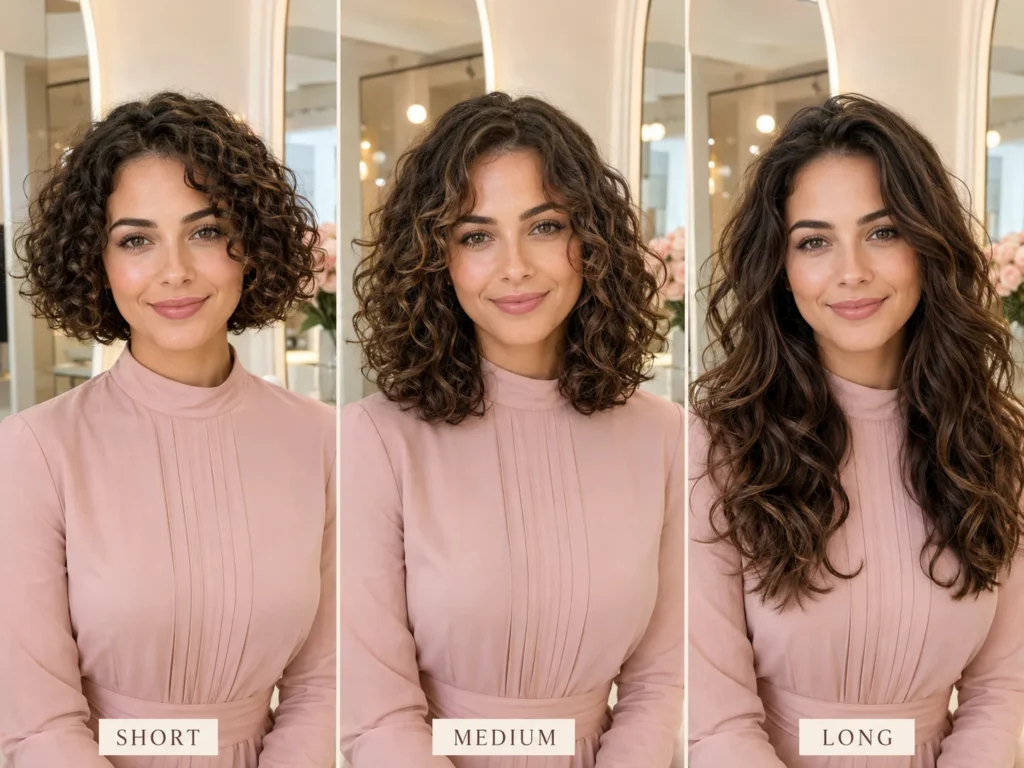
Use the preview to compare how each overall length balances your face, neck and shoulders.
Do not treat the generated endpoint as a cutting measurement. If the mockup shows curls resting exactly at the chin, your real hair may sit higher or lower depending on shrinkage, layering and styling.
Instead of telling your stylist to copy the length exactly, say:
“I like this general silhouette, but I want the finished length adjusted for how my hair normally dries.”
That gives the stylist useful direction without asking the image to do a measuring tape’s job.
Where Should the Volume Sit?
A shoulder-length rounded cut and a shoulder-length layered cut can feel completely different.
Shorter crown layers can create lift at the top. Layers beginning around the cheeks may produce a wider, rounder outline. Keeping more weight through the ends can make the hair appear longer and less expansive.
Look at the image from a distance. Where does your eye go first?
If you are deciding which proportions you prefer, our guide to finding a hairstyle by face shape can provide ideas. Face-shape advice is a starting point, though, not a rule that gets to overrule your personal taste.
Would Bangs Suit You?
AI previews are helpful for one basic bangs decision: do you like seeing hair across your forehead?
Compare full curly bangs, longer curtain bangs, a side fringe and face-framing layers without a true fringe. Focus on the amount of coverage and the balance around your eyes rather than the precise curl placement.
Curly bangs are particularly sensitive to shrinkage and cutting technique. If you like the idea but not the commitment, begin by previewing longer pieces that can blend back into the rest of the hair.
You can also browse these curtain bangs for curly hair to find realistic reference lengths before your appointment.
Should You Change the Color Instead?
Sometimes the haircut is not the part that excites you. It is the warmer brunette shade, copper tone or brighter face-framing color.
A preview can help you compare broad color families. It cannot tell you whether the shade is achievable in one appointment or how it will react with previous dye.
Your starting color, hair condition and underlying pigment still matter. Show the image to a colorist as a visual direction, not an exact formula.
Five Signs the Preview Is Not Trustworthy
A generated hairstyle may look impressive while quietly changing half the information you needed it to preserve.
Discard or regenerate the image when:
- Your forehead, jaw or head shape looks different.
- The hairline moves forward or becomes unusually symmetrical.
- The tool gives you much more hair than you naturally have.
- Loose waves become dense, uniform ringlets without being requested.
- The result only looks achievable with extensions, straightening or extensive daily styling.
Large hairstyle transformations are technically difficult because the system may need to invent hidden areas such as the forehead, scalp or hair behind the original style. Research into virtual hairstyle transfer identifies this reconstruction as one of the challenges when moving between very different cuts, such as long hair and a pixie. StyleGAN Salon research
The best preview is not necessarily the most glamorous. It is the one that still resembles you.
Take the Preview to Your Stylist

Choose two or three results and explain which part of each one you like.
You might say:
- “I like this length, but not the volume around the cheeks.”
- “I want these face-framing pieces without a full fringe.”
- “I like the rounded shape, but I usually air-dry.”
- “I want more lift at the crown without losing too much length.”
- “I like this color family, although I want to protect my curl condition.”
Tell the stylist how you wear your hair most days. A haircut styled with a polished blowout may look very different when air-dried. The same applies if the preview shows highly defined curls but your usual routine takes five minutes and ends somewhere around “scrunch and hope.”
Ask whether your cut should be performed wet, dry or with a combination of both. There is no universal method for every curl pattern. Redken’s professional curl-cutting guidance explains that both wet and dry techniques have advantages depending on the client’s hair, lifestyle and intended change.
Useful questions for the appointment include:
- How much shrinkage should I allow for?
- Will these layers make my hair wider or lighter?
- Can my density produce this shape?
- How will the cut look when air-dried?
- How often will it need reshaping?
- What styling does the reference image require?
These answers are more important than whether the AI placed every curl perfectly.
The Bottom Line
An AI hairstyle preview can help you decide whether you prefer short or long hair, bangs or an open forehead, rounded volume or a more elongated shape.
It cannot guarantee the exact finished length, curl definition, density or maintenance of a real haircut.
Use one clear photo, preserve your natural features, change one element at a time and reject results that give you a different face or unrealistic amount of hair. Then take the most believable options to a stylist who understands curly and wavy textures.
You may not walk into the salon knowing precisely how every curl will fall. You will, however, have a much clearer way to explain what you want and what you would rather avoid.